


|
|
|||
| forums: groups: | |||
|
"photos showing poor resolution"
11 posts 1508 views
 Love you, too
It seems to be coinciding with the latest major advances in the website but I have noticed that pictures are being blown up in size (larder than their original size) and it is making them look really bad. Has anybody else noticed this?


sounds like it has something to do with the original resolution of the pics and the scaling that is done. I know some resolutions DO NOT handle scaling well. We are at a point now with browsers that they need to play catch up with the higher resolutions as more and more users are uploading pic and video in like 4k and 2k the browsers have trouble scaling them up.
Build a pie pod and they will come

100% agree with that statement but i have also noticed that these pics are also getting the same amount of likes than high resolution pics as well i never like a pic of low image quality i only ever like pics that are of high resolution
Id like to add that from mobile devices it looks fine. That would explain why there isnt much change in loves/comments. But from a desktop browser they arent good looking when they once were good looking. I know because all of my photos I have uploaded over the past year i scale them down to 1024 pixels on their long side. But now it seems like the desktop browser is trying to make them larger and messing them up. It is also making my once 1024 pictures larger than my monitor and i actually have to scroll to see the whole picture which i hate and would never love or comment on a photo that doeant scale into my screen.

WildThang said: It seems to be coinciding with the latest major advances in the website but I have noticed that pictures are being blown up in size (larder than their original size) and it is making them look really bad. Has anybody else noticed this?
Can you please tell me which pictures you're looking at? The originals of most pictures uploaded are larger than the browser window already, and must be scaled down to fit. Not sure I understand what you see that's actually being enlarged?
Stay messy, my friends






Messmaster said:
Can you please tell me which pictures you're looking at? The originals of most pictures uploaded are larger than the browser window already, and must be scaled down to fit. Not sure I understand what you see that's actually being enlarged?
WildThang said: It seems to be coinciding with the latest major advances in the website but I have noticed that pictures are being blown up in size (larder than their original size) and it is making them look really bad. Has anybody else noticed this?
Can you please tell me which pictures you're looking at? The originals of most pictures uploaded are larger than the browser window already, and must be scaled down to fit. Not sure I understand what you see that's actually being enlarged?
Any picture really. I just opened the avatar picture of your account and it opens in a new window overlaying the regular page (like normal) but it is huge now and literally would have to scroll down 3 page heights to get to the bottom.
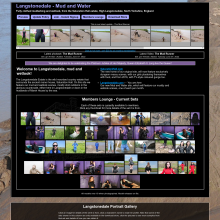
Saturation Hall, Langstonedale
Lord of the Pies

I'm seeing exactly the same thing, pics which I scaled down to fit the forums (in my case to 800px on the long side) now being blown up to massively larger than that when viewed via the forum pic viewer.
Example:
This post, last week's Saturation Hall promo for Friday and Teena in Mutual Messification II:
https://umd.net/forums/topicid/960376
Now after uploading them I've deliberately linked some of the full size pics into the main post - those are displayed fine and as they should be. That's the big ones you see first.
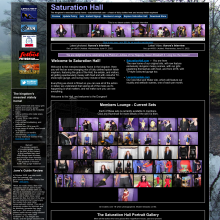
 Top of post with embedded images shown correctly - Image 001 below.
Scroll down to the upload thumbnails set at the bottom of the first post, there's a grid of 18 thumbnails. Those all look fine.
Grid of thumbnails - Image 002 below.
Click the 4th one on the top row, Friday, clean, looking straight at the camera. It opens in the forum browser, blown up to at least double if not more of its original size. You can see the pixelation in the text at the top of the image:
https://umd.net/showpic/image/media%2Fforum_uploads%2F9_23%2F2f2040029_uid_4749_1695131071_83140.jpg/height/800/return/%2Fforums%2Ftopicid%2F960376
- Image 003 below.
Now, right-click on the actual pic and "Open Image In New Tab" (this is in FireFox, other browsers will have similar).
The pic opens back down at its correct size.
- Image 004 below.
The problem is something to do with the forum pic browser.
Niote, I'm running Firefox in roughly half of a 32" 4K screen (I have Chrome on the other half, which I use for non-fetish purposes. Using different browsers, and each one only having memorised logins for the things it should access, avoids the risk of accidentally posting WAM images to Facebook or vanilla life stuff to a fet site. With a screen this size, running any app (other than a video editor) full screen would be bonkers, hence browsers use 1/2 width. I also have the Windows scaling set to 150% to make sure text is still readable.
Until the latest updates, images in the forum browser showed at the expected size, the change is very recent.
Example:
This post, last week's Saturation Hall promo for Friday and Teena in Mutual Messification II:
https://umd.net/forums/topicid/960376
Now after uploading them I've deliberately linked some of the full size pics into the main post - those are displayed fine and as they should be. That's the big ones you see first.
Top of post with embedded images shown correctly - Image 001 below. Scroll down to the upload thumbnails set at the bottom of the first post, there's a grid of 18 thumbnails. Those all look fine.
Grid of thumbnails - Image 002 below. Click the 4th one on the top row, Friday, clean, looking straight at the camera. It opens in the forum browser, blown up to at least double if not more of its original size. You can see the pixelation in the text at the top of the image:
https://umd.net/showpic/image/media%2Fforum_uploads%2F9_23%2F2f2040029_uid_4749_1695131071_83140.jpg/height/800/return/%2Fforums%2Ftopicid%2F960376
- Image 003 below. Now, right-click on the actual pic and "Open Image In New Tab" (this is in FireFox, other browsers will have similar).
The pic opens back down at its correct size.
- Image 004 below. The problem is something to do with the forum pic browser.
Niote, I'm running Firefox in roughly half of a 32" 4K screen (I have Chrome on the other half, which I use for non-fetish purposes. Using different browsers, and each one only having memorised logins for the things it should access, avoids the risk of accidentally posting WAM images to Facebook or vanilla life stuff to a fet site. With a screen this size, running any app (other than a video editor) full screen would be bonkers, hence browsers use 1/2 width. I also have the Windows scaling set to 150% to make sure text is still readable.
Until the latest updates, images in the forum browser showed at the expected size, the change is very recent.
Saturation Hall - Forth! The Gungemaidens!



Figured it out, I think. I had pics displaying at 100% width. I've changed it to max width of 100%. What yall think now? 
Stay messy, my friends
Saturation Hall, Langstonedale
Lord of the Pies
Messmaster said: Figured it out, I think. I had pics displaying at 100% width. I've changed it to max width of 100%. What yall think now?
That's fixed it, Friday is no longer 12' tall.

Saturation Hall - Forth! The Gungemaidens!
Sponsors






Design & Code ©1998-2026 Loverbuns, LLC 18 U.S.C. 2257 Record-Keeping Requirements Compliance Statement
Epoch Billing Support Log In